Multiple templates
Choose a layout, then adjust your logo, colours, header sizing and light or dark theme so the site looks like your dealership.
Your digital showroom
Every DealerHub plan includes a branded, mobile-ready dealer website, with hosting included. Your vehicles, photos and prices come straight from DealerHub inventory, so the website stays in step with your lot without anyone re-entering cars.
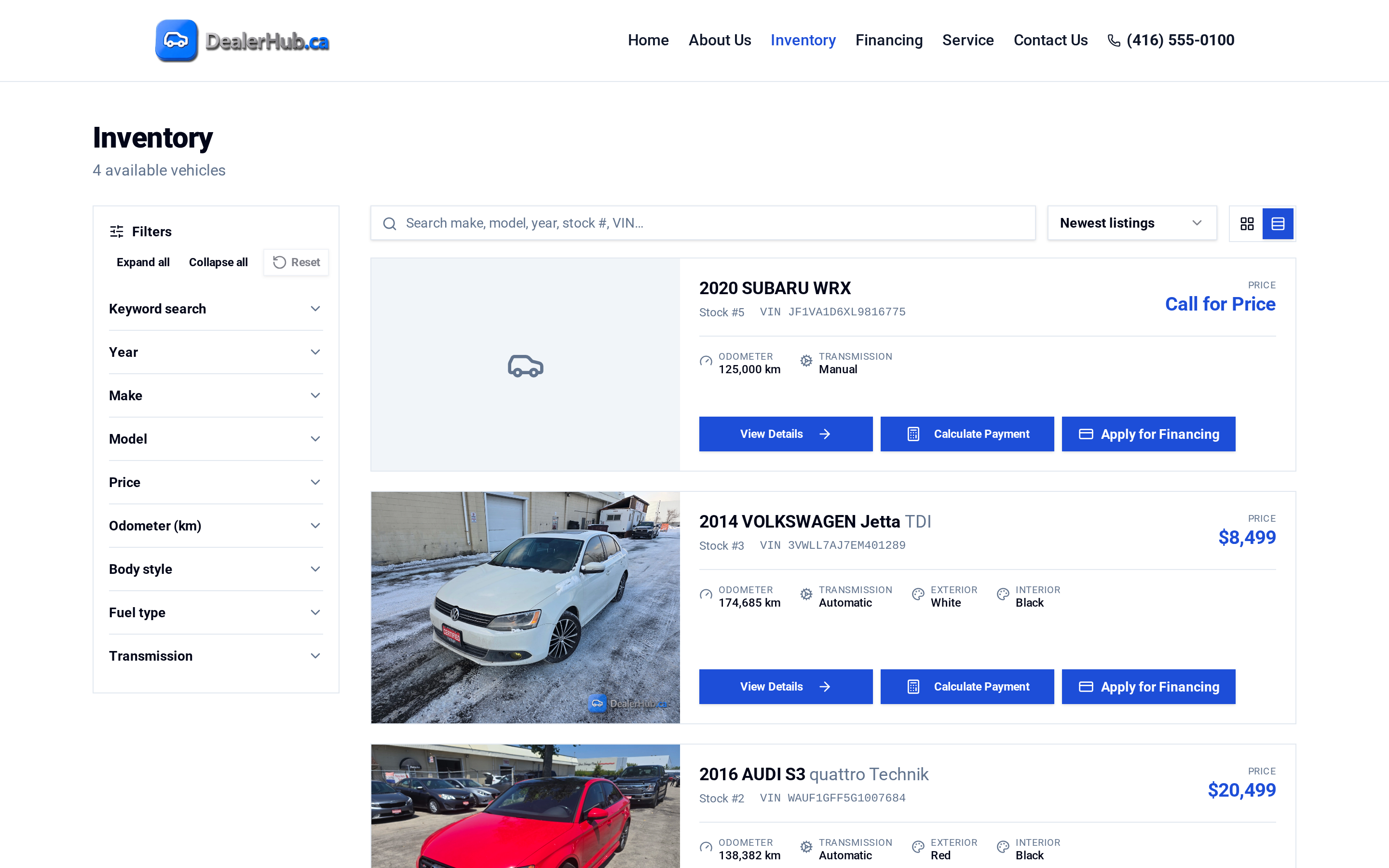
Your DealerHub website is your online showroom. Shoppers can browse your inventory, filter to what they want, view a vehicle's details and CARFAX Canada information, ask the AI sales chat questions, estimate a payment and apply for credit, then contact you or visit. Behind the scenes, the site reads from the same inventory your team manages in DealerHub. When you add, reprice or sell a vehicle, the website reflects it.
Choose a layout, then adjust your logo, colours, header sizing and light or dark theme so the site looks like your dealership.
Give shoppers grid and list views, advanced filters and clear vehicle details. Vehicles without a published price show as Call for Price.
With DealerHub's CARFAX Canada integration, listings show vehicle history information shoppers look for before they call.
An AI sales chat on your website holds a natural conversation with shoppers and answers questions about your vehicles 24/7, using real vehicle information from CARFAX Canada.
Learn about AI Sales Chat →Publish a financing page with an online credit application form and a payment calculator, so shoppers can estimate monthly payments and start an application from your site.
Add a contact page with a map so customers can find you, and an optional service page if your store offers service.
Retail vehicles update from DealerHub automatically. There's no second vehicle catalogue to maintain.
Hosting is included. At signup you choose a subdomain (yourdealership.dealerhub.ca), and you can connect your own custom domain at signup or later.
You don't "update the website". You update inventory. Add a vehicle and mark it Available, and it's on your site. Change the price at the desk and the site shows the new price. Sell it, and the site reflects it. After hours, the AI sales chat keeps answering shoppers' questions. When you want a fresh look, adjust your template, colours or theme from your DealerHub settings.
Yes. A hosted dealer website with inventory and financing tools is included on every plan.
Yes. You can add a custom domain at signup or later. Your site is also available at your DealerHub subdomain.
Yes. DealerHub dealer websites are mobile-ready.
Yes. DealerHub's CARFAX Canada integration brings vehicle history information to your listings.
Yes. Your financing page includes an online credit application form and a payment calculator.
Start a free trial to set up your site, or book a demo and we'll show you a dealer website running on live inventory.
Continue exploring